Resume sections: what to include and in what order
Learn which resume sections to include, where to put them, and how to choose the right order for your career stage, with a complete example.


What sections should a resume have?
Most US resumes need four foundations: contact information, work experience, education, and skills. A short professional summary or objective can sit above them if it helps explain your fit. Add other sections, such as Projects or Certifications, only when they contribute something useful.
The University of Pennsylvania’s resume guide recommends choosing information for the opportunity you want. A student with strong coursework might lead with Education. Someone with relevant work history will usually lead with Experience.
A practical starting order is the header, optional summary, experience, education, skills, then relevant extra sections. It is a starting layout rather than a fixed rule.
The main resume sections, explained
Contact information
Put your name, a reliable phone number, a professional email address, and your city and state at the top. Add a LinkedIn profile or portfolio if it is relevant and current. A full street address is generally unnecessary.
For most US jobs, leave out a headshot, birth date, and marital status. The University of Southern California’s career center advises that these personal details are not needed in typical US applications. Other countries and specialized roles may follow different conventions.
Summary or objective
A summary can help connect experience from several roles to your target job. An objective may explain a new direction if you are changing careers or entering the workforce. Neither is compulsory.
Be specific about the skills and work you can support. Our resume objective guide shows when an objective helps and when a summary is a better introduction. If the rest of your resume makes your direction obvious, skip both.
Work experience
For each relevant role, include the title, organization, location when appropriate, and dates. List the most recent first; our chronological resume example shows how to order promotions and overlapping jobs. Write bullets that show what you did, the tools or tasks involved, and any outcome you can substantiate. Our guide to resume keywords shows how to use a job posting’s terms in those bullets.
“Helped with scheduling” is vague. “Maintained the team coverage calendar and logged shift changes in a shared tracker” tells the reader what the work involved without an invented percentage.
The Harvard resume guide recommends reverse chronological order within sections and clear, specific descriptions.
Education
Include your school, degree or credential, and graduation or expected graduation date. Recent graduates can add relevant coursework or projects if that is stronger evidence than their work history. Our entry-level resume guide shows how to choose those experiences and describe your contribution.
A GPA is optional unless requested. The Penn guide lists it among details you can include, alongside courses, honors, and awards. Do not add it only because a template has a field.
Skills
Choose skills you can demonstrate: software, methods, languages, equipment, or specific professional techniques. A list of tools is easier to evaluate when you also show where you used them.
For example, if you write “Excel,” specify filters, pivot tables, or other features you actually know. Use your experience and project bullets to support the skills you claim. Our guide to hard skills for a resume shows how to word and prove each one. A Skills section is an index, not a substitute for evidence.
Optional resume sections: what earns a place?
Use an extra section when it answers a question the core resume does not. Do not include one merely to fill blank space.
| Section | Include it when | Leave it out or shorten it when |
|---|---|---|
| Certifications and licenses | A current credential supports or is required for the target job | The credential is irrelevant or expired |
| Projects | Work from class, volunteering, freelancing, or personal practice shows relevant skills | It only repeats an existing job bullet |
| Volunteer experience | Responsibilities demonstrate useful skills or leadership | The details do not support this application |
| Languages | Language ability matters and your proficiency statement is accurate | Your claimed level would be misleading |
| Awards and publications | The work is meaningful to this employer | It takes too much explanation for its value |
| Professional associations | Participation relates to your field | It adds little beyond a membership name |
A recent graduate might use a Projects section. An experienced applicant may need only a line of Certifications. A career changer may bring a relevant volunteer project forward.
A complete resume example, with the sections labeled
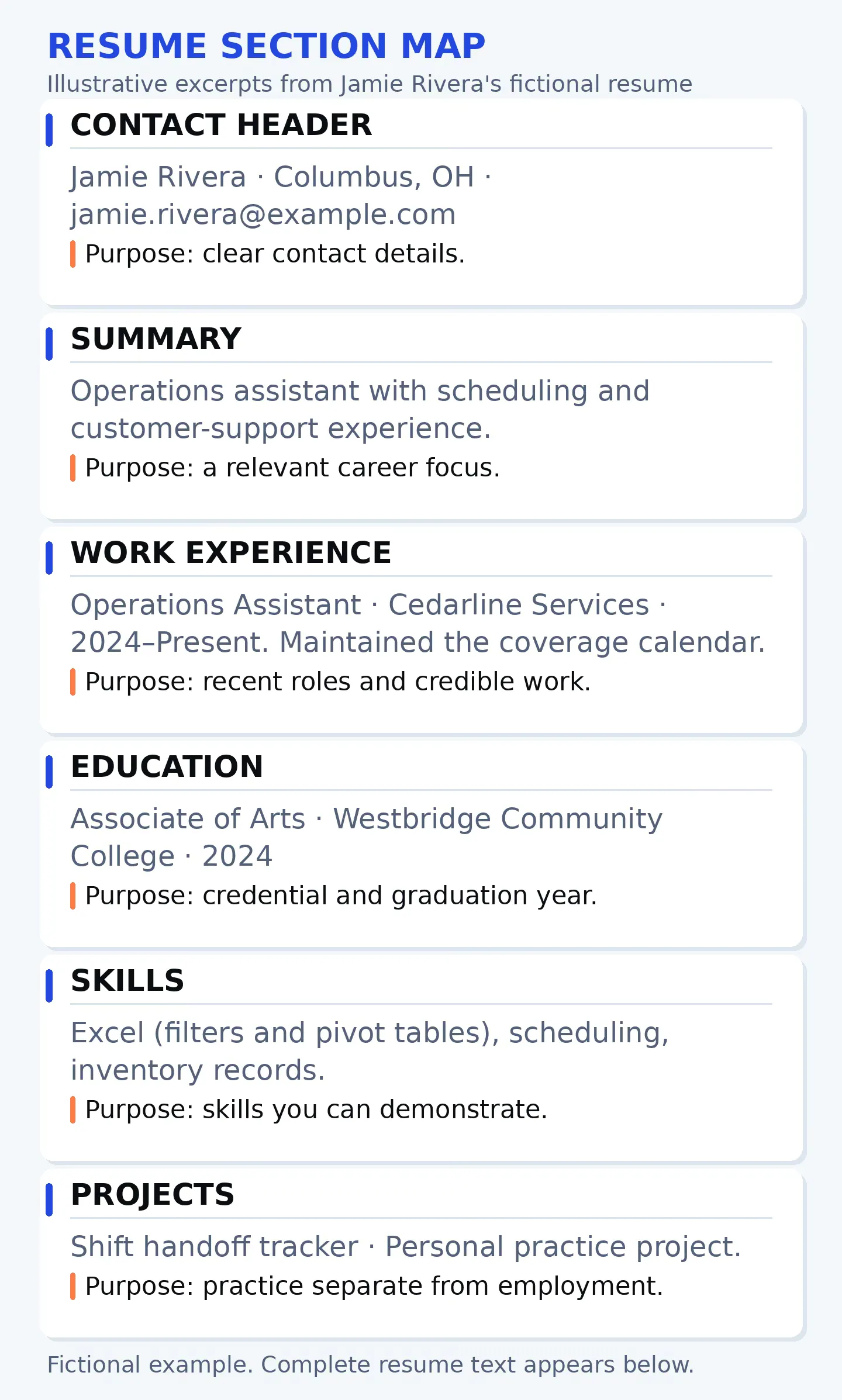
The sample below is entirely fictional. Jamie Rivera, the employers, the school, contact details, and the project are illustrative. Its tasks are examples, not claims about a real person’s achievements.
JAMIE RIVERA
Columbus, OH | jamie.rivera@example.com | 614-555-0147

SUMMARY
Operations assistant experienced in coordinating schedules,
handling customer requests and maintaining shared records.

WORK EXPERIENCE
Operations Assistant | Cedarline Services | Columbus, OH
June 2024–Present
- Maintained the coverage calendar and recorded shift changes
  in the team's shared schedule.
- Prepared weekly inventory spreadsheets for department leads.

Customer Service Associate | Harbor Trail Market | Columbus, OH
May 2022–May 2024
- Resolved customer questions and documented returns.
- Trained new team members on return procedures.

EDUCATION
Associate of Arts | Westbridge Community College | 2024

SKILLS
Excel (filters and pivot tables), scheduling, inventory records,
customer support, shared-document maintenance

PROJECTS
Shift handoff tracker | Personal practice project
- Created a sample spreadsheet for shift notes and open requests.
Here is what each part does:
| Section | Purpose in this example |
|---|---|
| Contact header | Makes Jamie reachable without hunting for details |
| Summary | Explains the type of operations work Jamie wants to emphasize |
| Work Experience | Shows actual responsibilities, with the latest role first |
| Education | Identifies the credential and year |
| Skills | Groups relevant, specific capabilities |
| Projects | Separates a personal practice exercise from employment |
The project is clearly labeled as practice work, so nobody will mistake it for paid employment. The bullets do not invent sales figures or time savings. You can copy the structure while replacing every example with your own accurate information.
The best section order for your career stage
Choose an order by asking which part of your background best proves you can do the work. You can rearrange sections without hiding roles or changing dates.
| Situation | Suggested order after the header | Why this works |
|---|---|---|
| Student or recent graduate | Education → Projects or relevant experience → Skills → Other experience | Coursework and projects may be your best evidence |
| Experienced professional | Summary if helpful → Experience → Skills → Education → Relevant extras | Recent responsibilities and results carry more weight |
| Career changer | Targeted summary → Relevant Skills or Projects → Experience → Education | Transferable evidence appears early while your history stays complete |
These are practical starting points, not strict employer requirements. Penn’s student resume samples advise beginning with your strongest qualification, often Education for a student. Harvard’s format guidance recommends ordering headings by importance to the target role.
If you are struggling to fit everything, read our guide to resume length. Shortening older, unrelated details is often better than compressing every section.
Compare the experienced and recent-graduate section orders in our tested ATS-friendly resume examples, with complete text you can adapt.
Use section headings people recognize
Creative labels may express personality, but they make readers interpret what the section contains. Plain labels get to the point.
| Standard heading | Creative alternative | What the standard heading clarifies |
|---|---|---|
| Work Experience | Where I’ve Been | This section is about employment |
| Skills | My Toolkit | It contains capabilities and tools |
| Education | My Learning Journey | It lists education and credentials |
| Projects | Things I’ve Built | It describes demonstrable work |
This table compares meaning and clarity, not measured ATS performance. We have not run a controlled test of these heading pairs in an employer’s application system, and different parsers may behave differently.
Our test: the same resume with both sets of headings
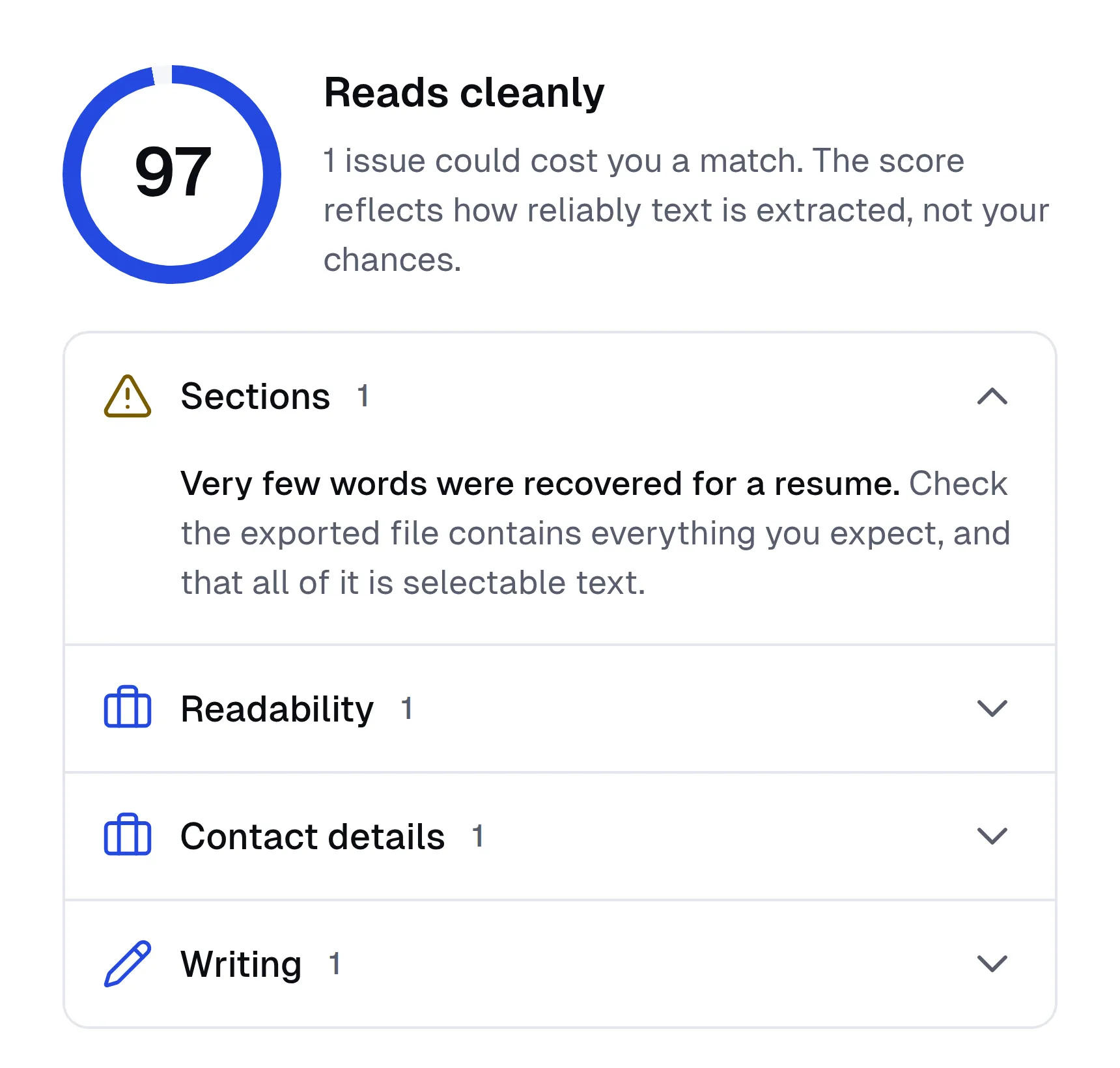
We built Jamie’s example resume in the ResumeUnbox editor and exported it twice: once with the standard headings from the table, once with the creative ones. Nothing else changed, and the Summary heading was the same in both. On November 3, 2026 we ran both PDFs through the ResumeUnbox ATS-style checker without a job posting.
- Standard headings: score 97. The checker flagged no missing section. Its only section note was that very few words were recovered, because this example is short.
- Creative headings: score 60. It recognized only the Summary heading and reported no work-experience, education or skills section.
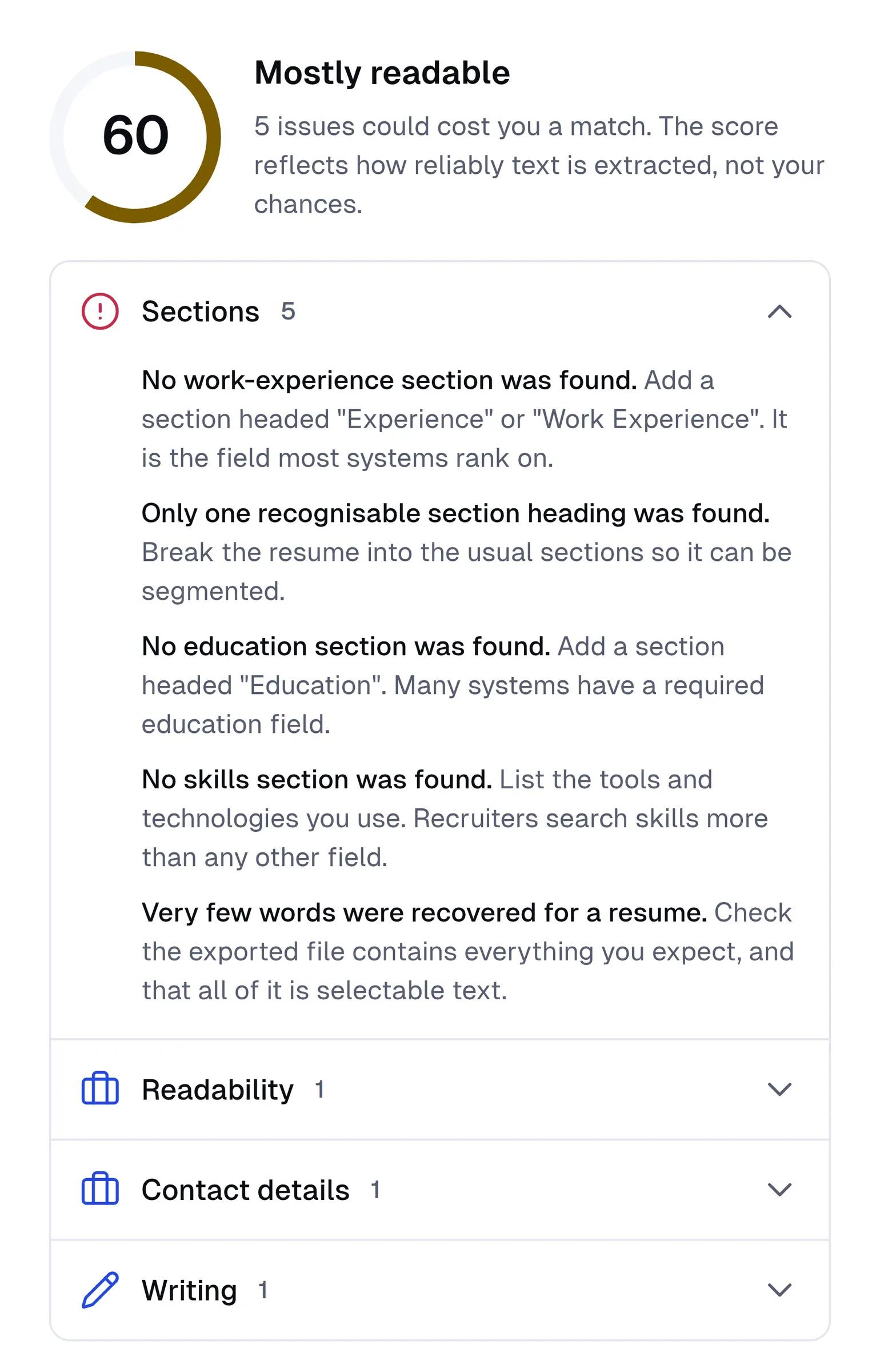
The other notes (readability, contact details and writing) were the same for both files. This is our checker’s result: it matches headings against a fixed list of common English titles, so it shows what one parser does, not how every ATS behaves. Check your own headings before you apply.
Our ATS-friendly resume guide shows actual readability tests on document layouts, with the results and limits explained.
Check your exported sections before applying
The document you upload matters more than the editor preview. Open your exported file and check that the reading order and text survived.
- Look for a complete name and contact header.
- Read the headings in the order an employer would see them.
- Copy the text into a plain-text editor to catch missing or scrambled content.
- Run the file through the ResumeUnbox ATS-style checker and review the displayed readability findings.
- Compare the resume with the posting and adjust wording only when it truthfully describes your work.