Chronological resume: example and work-history order
Build a chronological resume with a complete example, clear dates for promotions and overlapping jobs, and a comparison with other resume formats.


What is a chronological resume?
A chronological resume organizes work experience around dated jobs, with the newest first. You may also see it called a reverse chronological resume. In resume advice, those names usually describe the same arrangement.
James Madison University’s format guide recommends listing the most recent position first within each experience heading. Start with the job you hold now; if you are between jobs, start with the one that ended most recently.
This format gives each accomplishment a home: the role where you did the work. It is a useful starting point when your recent responsibilities support the job you want. You can still include a summary, skills, education, or projects. Our resume sections guide explains how to choose those sections.
A chronological resume example, with notes
Lena Marlow is a fictional operations coordinator who was promoted at one employer and also worked a part-time event job. Every name, organization, date, contact detail and responsibility below is invented for this example. Copy the structure and replace the content with your own accurate experience.
The sample keeps each role’s title, employer, dates and bullets together. The full page and copyable text follow; the notes below explain the ordering decisions.
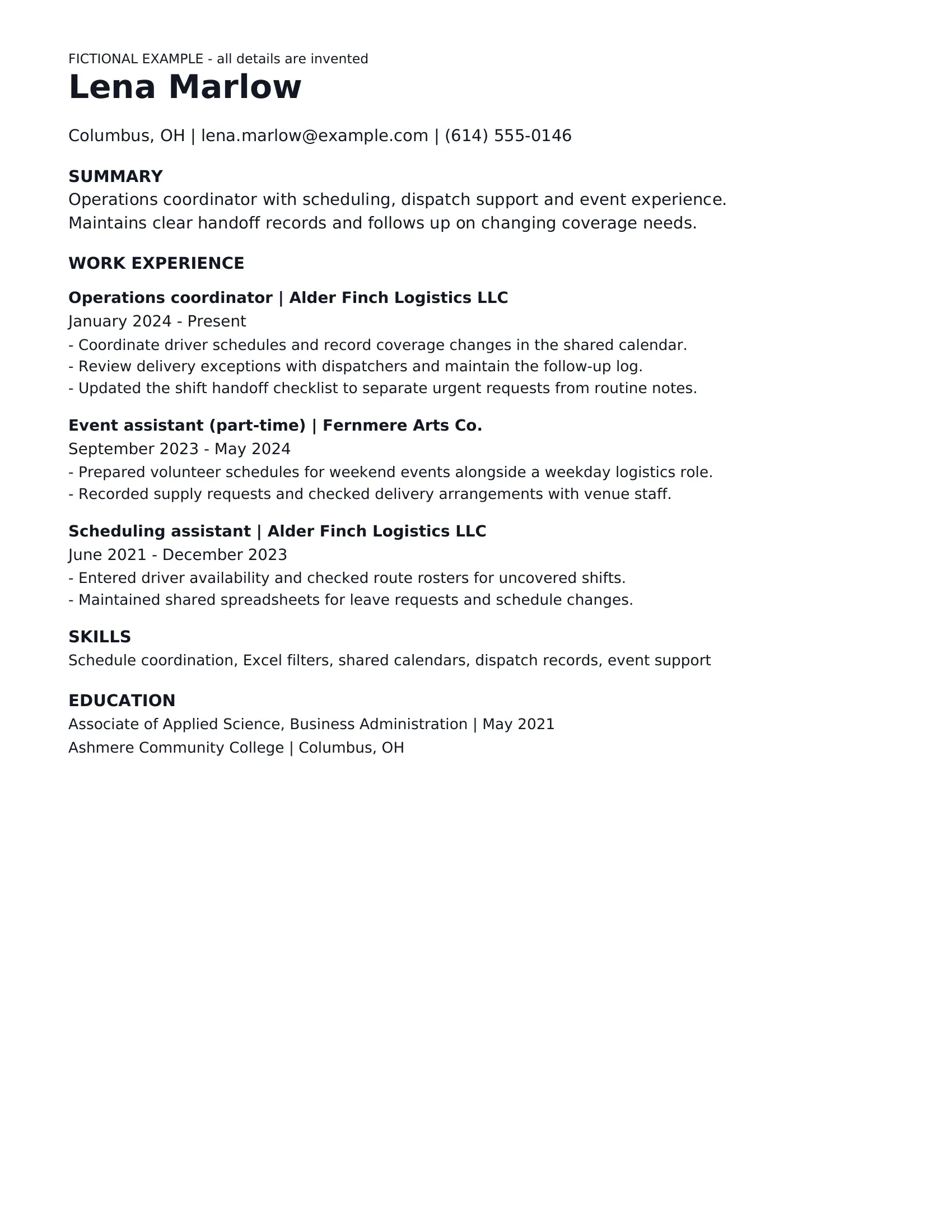
FICTIONAL EXAMPLE - all details are invented
Lena Marlow
Columbus, OH | lena.marlow@example.com | (614) 555-0146

SUMMARY
Operations coordinator with scheduling, dispatch support and event experience.
Maintains clear handoff records and follows up on changing coverage needs.

WORK EXPERIENCE
Operations coordinator | Alder Finch Logistics LLC
January 2024 - Present
- Coordinate driver schedules and record coverage changes in the shared calendar.
- Review delivery exceptions with dispatchers and maintain the follow-up log.
- Updated the shift handoff checklist to separate urgent requests from routine notes.

Event assistant (part-time) | Fernmere Arts Co.
September 2023 - May 2024
- Prepared volunteer schedules for weekend events alongside a weekday logistics role.
- Recorded supply requests and checked delivery arrangements with venue staff.

Scheduling assistant | Alder Finch Logistics LLC
June 2021 - December 2023
- Entered driver availability and checked route rosters for uncovered shifts.
- Maintained shared spreadsheets for leave requests and schedule changes.

SKILLS
Schedule coordination, Excel filters, shared calendars, dispatch records, event support

EDUCATION
Associate of Applied Science, Business Administration | May 2021
Ashmere Community College | Columbus, OH
Why the jobs appear in this order
| Entry | Decision in this fictional example |
|---|---|
| Operations coordinator, January 2024–Present | The current role leads, even though the part-time job overlapped it. |
| Event assistant, September 2023–May 2024 | Among the completed roles, this one ended most recently. The part-time label explains how it fit alongside the logistics work. |
| Scheduling assistant, June 2021–December 2023 | This was Lena’s earlier role at the logistics employer. It has its own dates and responsibilities. |
The promotion stays accurate. Repeating Alder Finch Logistics LLC makes the employer explicit for both roles. Combining them under “Operations coordinator, June 2021–Present” would falsely extend Lena’s newer title back to the start of employment.
The overlap stays visible. September 2023–May 2024 crosses both logistics roles. We keep those dates and explain the weekend work in a bullet. There is no need to make the jobs look sequential.
The bullets belong to particular jobs. The newer role includes coordinating schedules and following up on delivery exceptions. The earlier role focuses on entering availability and checking rosters. The difference shows how the work changed without adding an unsupported performance figure.
How to put your work history in order
Start with a private list of your titles, employers and start and end months. Check uncertain dates against your records before copying them into the resume.
- Put current roles first. For completed jobs, use the most recent end date first. If you hold two jobs now, put the one most relevant to this application first and label part-time or contract work accurately.
- Give each role its own date range. Use the same month-year style throughout. Use “Present” only for work you still do.
- Attach bullets to the right role. Describe the work and any result you can support. Do not move an achievement into a newer job because it looks stronger there.
- Adjust detail for relevance. An older, relevant job can have more detail than a recent unrelated one. Keep its place in the timeline and shorten less useful bullets elsewhere.
You can use separate headings such as Relevant Experience and Additional Experience when they help explain a career change. Keep reverse date order inside each heading. Make the distinction clear enough that the reader understands why the page contains two timelines.
For wording help after you have sorted the roles, use our worked resume keyword example. It shows how to connect a posting’s requirements to experience you can substantiate.
Promotions at the same employer
Separate entries, as in Lena’s example, are straightforward when responsibilities changed. Repeat the employer, give each title its own dates, and put the newer role first.
You can also use one employer heading with dated roles beneath it. Keep the date range beside each title so a reader can tell when the promotion happened. Avoid a stack of titles followed by one undated bullet list if it obscures which work belongs to which role.
Gaps, temporary work and older jobs
A chronological resume can include a career break. Keep employment dates accurate. If a brief label helps explain the timeline, use one you are comfortable sharing, such as “Career break,” with the relevant dates. You do not need to turn personal responsibilities into invented employment.
Label temporary or contract work as such when that context explains a short engagement. For agency placements, name the actual employer and distinguish the client assignment where relevant. Follow any application form’s separate instructions about employment history.
Choose older roles for their relevance to this application. For decisions about how much history and detail to retain, see our resume length guide.
Chronological vs. functional vs. combination
These formats differ in where they put the evidence. A functional resume groups it under skills; a chronological resume groups it under dated roles. A combination resume brings selected skills or accomplishments forward while retaining work history. JMU’s format examples illustrate these approaches.
| Format | Main organizing choice | Consider it when |
|---|---|---|
| Chronological | Dated job entries carry the detail. | Your recent work gives a clear account of your fit. |
| Functional | Skill categories carry the detail; job history gets less space. | You need to gather evidence from different kinds of experience, while still making employers and dates easy to find. |
| Combination | Relevant skills or accomplishments come before dated roles. | You need to explain a change of direction before the reader reaches your work history. |
For Lena, the chronological version makes the move from scheduling assistant to coordinator visible. If she were applying for an events role, a combination version could bring her event scheduling experience forward, then retain the dated jobs underneath. Her employment dates and responsibilities would stay the same.
A summary and a short Skills section do not require a major redesign. Focus on whether the reader can find the evidence for the target job and see where you gained it.
Does chronological order make a resume ATS-friendly?
Keep job order and file readability as separate checks. Greenhouse’s resume parsing documentation lists columns, complex tables, headers, footers and unclear sections among possible causes of parsing problems. That is guidance about one system’s ability to read a file, not a promise about hiring outcomes.
Use a straightforward layout and follow the employer’s requested file type. Our tested ATS-friendly resume example covers document layout and checking the information recovered from an export.
Our check: newest first and oldest first
On November 23, 2026, we made two one-page PDFs from Lena’s fictional resume with ReportLab. Both used the same text, embedded DejaVu Sans fonts and single-column layout. We reversed only the order of the three complete job entries in the second file. We uploaded both to the live ResumeUnbox ATS-style checker without a job posting.
| Work experience order recovered by the checker | Readability score | |
|---|---|---|
| Newest first | Coordinator → event assistant → scheduling assistant | 100/100 |
| Oldest first | Scheduling assistant → event assistant → coordinator | 100/100 |
The checker preserved the titles, employers and date ranges in their displayed order in both files. The complete sample text above matches the newest-first file’s recovered wording, with blank lines added for reading. Neither report flagged job order. We still recommend the newest-first version for this chronological example.
Both reports gave the same advice: the PDFs lacked a declared document language and accessibility tags, and the resume had no profile or portfolio link. The writing checks said that few bullets have numbers and that bullets open with filler. The bullets already begin with verbs such as “Coordinate” and “Prepared.” Review that advice against the actual text, and add figures only when you have evidence for them. A relevant work link is useful if you have one.
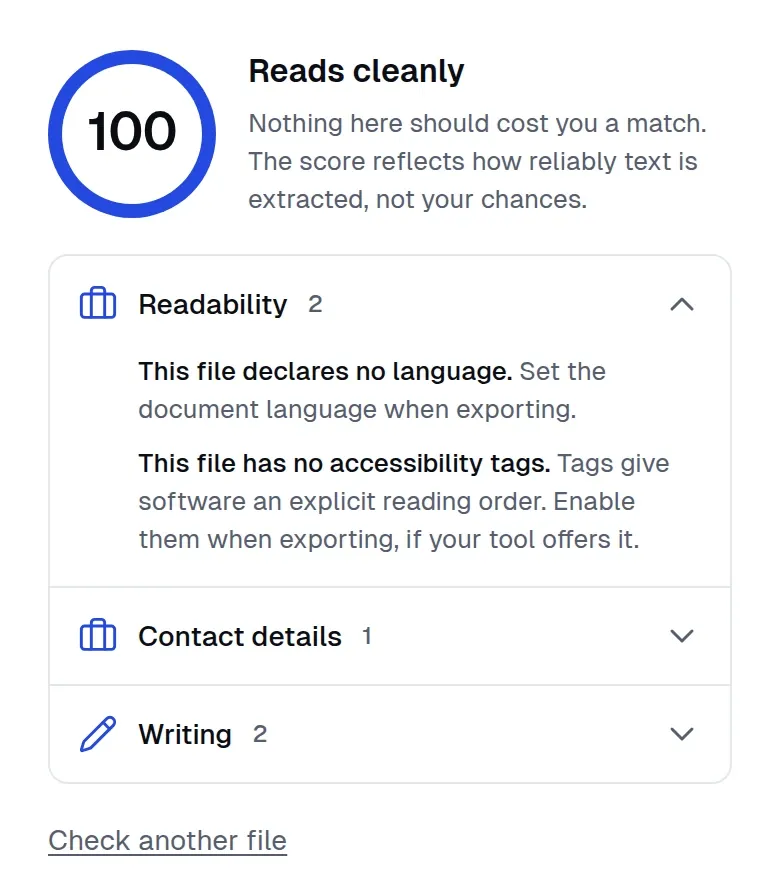
This was a readability check of two files in our tool. We did not submit them to an employer’s ATS or test functional and combination layouts. The matching scores show why you should review chronology yourself; they do not establish that every system treats these formats alike.
Before you send your resume
You can arrange your entries in the ResumeUnbox editor and review the exported PDF with the ATS-style checker. Read the jobs from top to bottom yourself, even when the file scores well.