Resume keywords: how to find and use them (worked example)
Find resume keywords in a job posting, decide which ones reflect your experience, and follow a worked example with honest before-and-after edits.


What are resume keywords?
A resume keyword is a term an employer may use to describe or find a qualification. It might be a job title, a specific program, a certification, or a kind of work. The useful keywords vary by job; there is no single list that works for every application.
- Hard skills: Spreadsheet reporting or inventory reconciliation, supported by skills and experience.
- Software: Google Analytics 4 or Salesforce, where you actually used the tool.
- Titles and functions: Your real job title and responsibilities, not a borrowed title.
- Credentials: Relevant certifications and licenses under a clearly labeled section. See how to list certifications.
- Industry terms: UTM tagging or SEO, explained through work or projects.
- Soft skills: Communication and collaboration, demonstrated through specific actions.
Use the exact job title only if it truthfully describes a role you held. You can describe related work in a summary without rewriting an old job title to match the opening.
Why ATS keywords matter to software and people
Applicant tracking systems help companies collect and manage applications. Some include a way for recruiters to search candidate resumes for words or phrases. Greenhouse documents a full-text keyword search that shows matching candidates and snippets from their profiles. Lever’s candidate search documentation also describes searching parseable resume content.
That makes recognizable terminology useful, but it does not mean every applicant tracking system rejects resumes for missing a fixed number of keywords. Search behavior, parsing, screening questions, and employer decisions vary. A recruiter reading your resume also needs enough context to understand what you actually did.
How to find resume keywords in a job description
Read the whole listing, then work through it once with a highlighter or a separate notes document.
- Mark required qualifications. Look for the employer’s specific tools, methods, certifications, and responsibilities, especially under “Required” or “Qualifications.”
- Mark preferred qualifications separately. These may help you describe useful extra experience, but do not make up a skill to fill the list.
- Notice repeated concepts. A term in both responsibilities and requirements deserves attention. Repetition is a clue about emphasis, not a mathematical ranking.
- Compare each term with your real experience. Mark it as already clear, true but missing, true under different wording, or not true.
- Choose a place for each supported term. A skills list helps scanning; an experience bullet gives evidence.
UC Berkeley’s resume guidance recommends analyzing required and preferred qualifications and tailoring your accomplishments to show relevant abilities. Start there, rather than copying an online list of “best resume keywords.”
Paste your job posting and exported PDF into the ResumeUnbox ATS-style checker to see which terms it finds. Review the flagged terms against your actual experience before editing.
Worked example: a job posting and a real editing decision
Fictional example: Talia Rivera is applying for a digital marketing coordinator role at Brightwater Home Goods. Both the applicant and the posting are invented to show a repeatable editing method, not actual hiring results.
Here is the sample job posting, shortened for this lesson:
Digital marketing coordinator — Brightwater Home Goods (fictional)
Maintain Google Analytics 4 (GA4) reports and Looker Studio dashboards. Track campaign links with UTM parameters, prepare email segmentation lists, and coordinate search engine optimization (SEO) content updates.
Required: GA4, Looker Studio, UTM tagging, email segmentation, and coordination with the content team.
Preferred: SQL reporting and paid search campaign experience.
The repeated terms are easy to spot: GA4, Looker Studio, UTM, and email segmentation appear in both the responsibilities and requirements. SQL and paid search appear only as preferred qualifications.
Make a keyword decision table
Talia’s fictional work history includes analytics reporting, dashboards, link tagging, segmented email campaigns, and content updates. She has not used SQL or managed paid search campaigns.
Here is the decision for each term, including its type, number of mentions in the fictional posting, priority, and whether it accurately describes Talia:
- GA4 (software): 2 mentions, required. Yes. Name her reporting work.
- Looker Studio (software): 2 mentions, required. Yes. Show the dashboards she maintained.
- UTM tagging (method): 2 mentions, required. Yes. Describe her tagged campaign links.
- Email segmentation (method): 2 mentions, required. Yes. Show how she prepared mailing lists.
- SEO (industry term): 1 mention, responsibility. Yes. Name her content updates.
- Content-team coordination (responsibility): 1 mention, required. Yes. Describe the collaboration.
- SQL (hard skill): 1 mention, preferred. No. Leave it out.
- Paid search (hard skill): 1 mention, preferred. No. Leave it out.
The mention counts above come only from the fictional posting printed on this page. They are not ATS measurements or evidence about how employers rank candidates.
A missing term can mean that a real skill was omitted, the wording differs, or the qualification is not true. Each case needs a different decision.
Before: a resume with vague language
Talia’s fictional original resume says:
Summary: Marketing team member with experience in reporting, campaigns, and communication.
Experience: marketing assistant
- Worked with analytics software and made regular performance reports.
- Helped with campaign links and email lists.
- Supported the content team with website improvements.
- Prepared slides and updated team spreadsheets.
The bullets describe broad activities, but they hide the tools and procedures she actually used.
After: show the keywords in believable work
Summary: Digital marketing assistant experienced in Google Analytics 4 (GA4) reporting, campaign link tagging, and content coordination.
Skills: GA4; Looker Studio; UTM parameters; email segmentation; search engine optimization (SEO) coordination.
Experience: marketing assistant
- Produced weekly reports in Google Analytics 4 (GA4) and maintained Looker Studio dashboards for campaign reviews.
- Added UTM parameters to campaign URLs and checked traffic sources for weekly reporting.
- Prepared email segmentation lists and supported targeted newsletter sends.
- Coordinated search engine optimization (SEO) content updates with the site editor.
These rewritten bullets are illustrative, not measured achievements. Talia can defend each claim in this fictional scenario. SQL and paid search stay off the resume because she does not have that experience. The “after” version contains more explicit language from the job posting, but no ATS outcome or interview improvement is claimed.
What the checker found, before and after
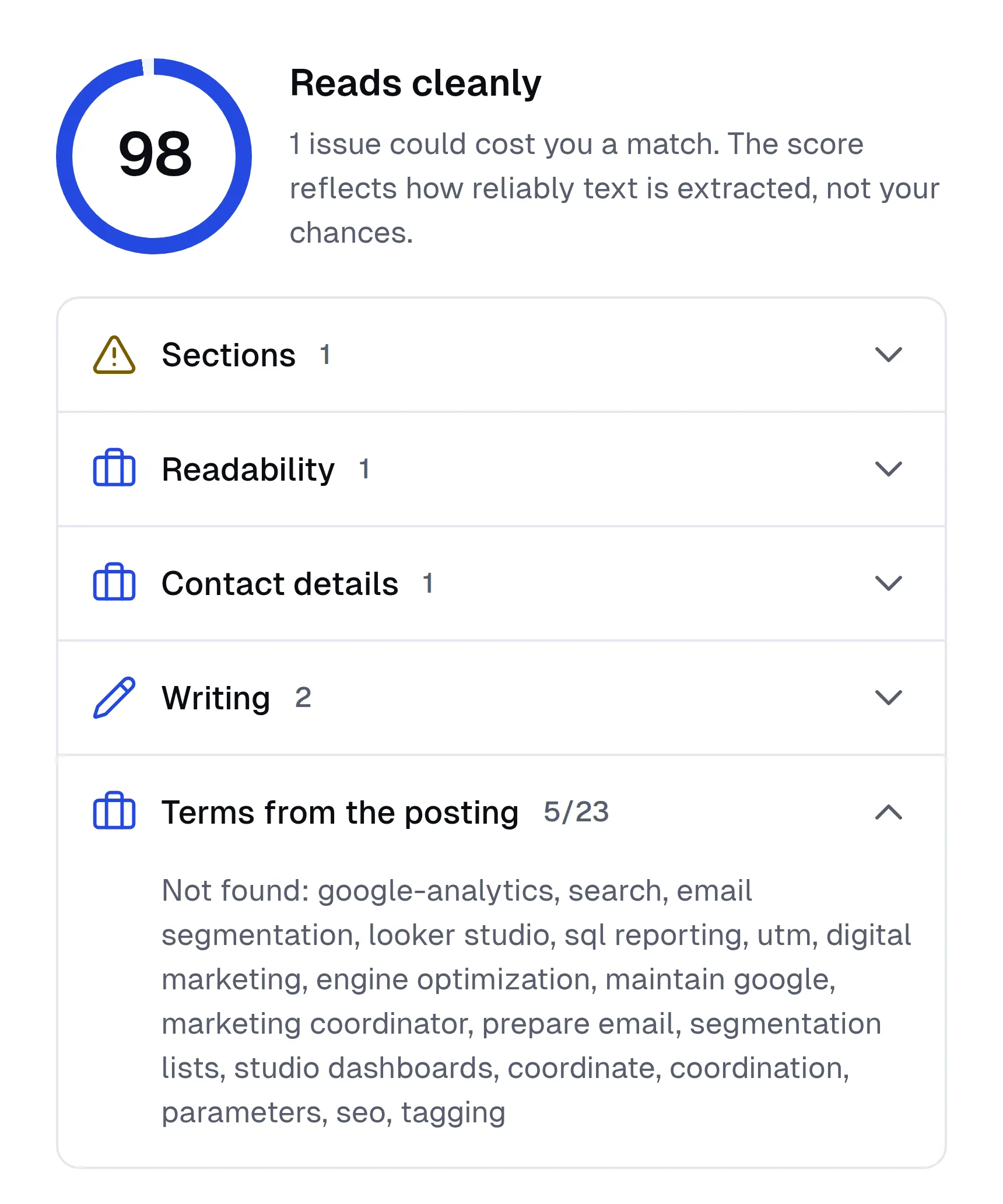
We built both versions in the ResumeUnbox editor, exported each one as a PDF and ran it through the ResumeUnbox ATS-style checker with the posting above (without the company name) on November 3, 2026. Talia’s full resume also lists an earlier internship, a part-time job at her college’s recreation center and her degree; those parts are the same in both versions.
- Before: 5 of the posting’s 23 terms. Among those not found: google-analytics, looker studio, utm, email segmentation, seo and sql reporting.
- After: 20 of 23. Still not found: sql reporting, maintain google and marketing coordinator.
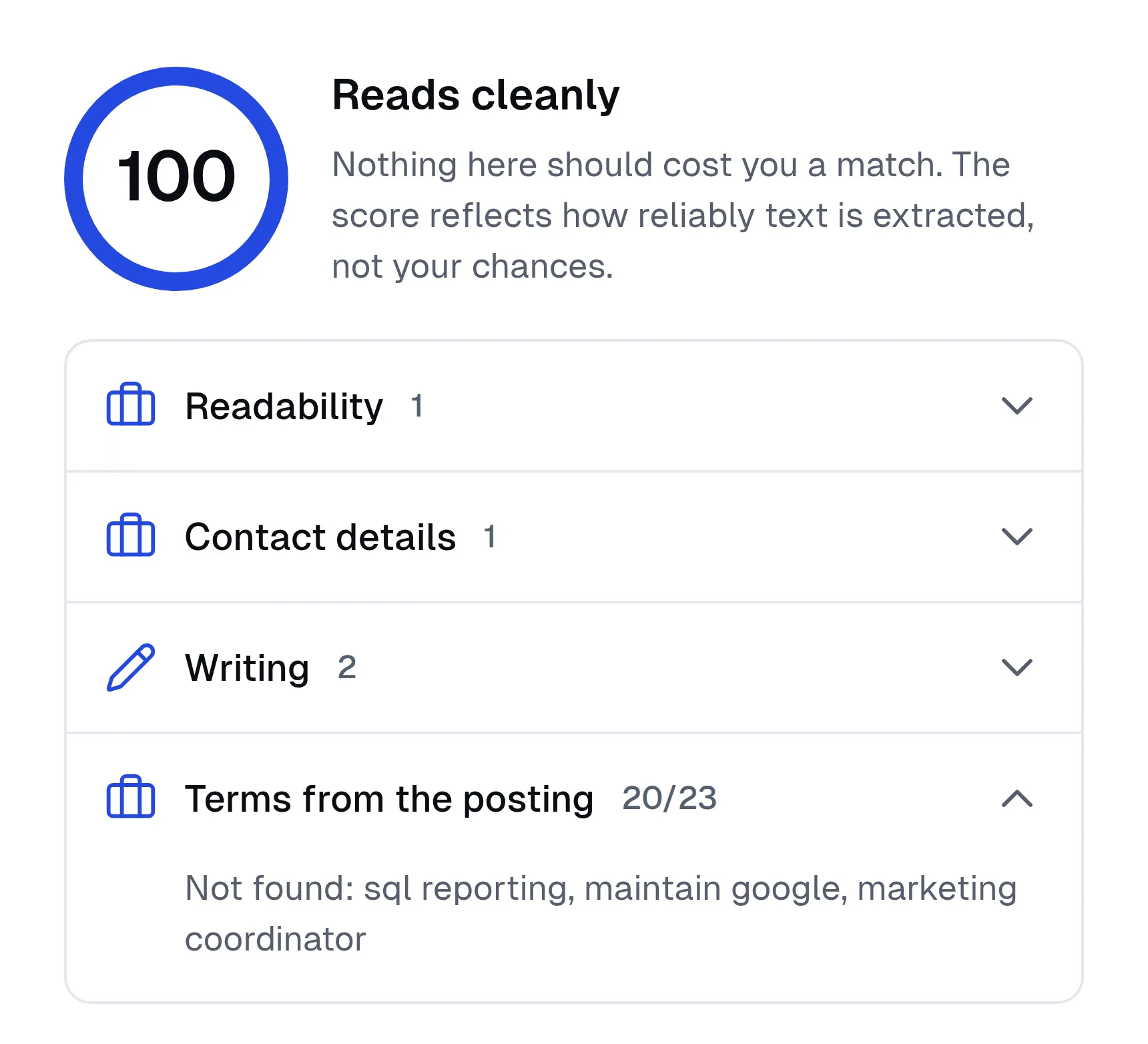
We sorted the three terms still missing instead of adding them:
- sql reporting: not true for Talia, so it stays out.
- marketing coordinator: the title of the job she wants. Her real title is marketing assistant, so she doesn’t rename her job.
- maintain google: a fragment of “Maintain Google Analytics 4”. Her bullets already say she produced reports in Google Analytics 4, so it’s true but worded differently.
In the editor, Check → Job match showed the same 5 of 23 for the before version, with each missing term under “Not in your resume · add only if true”. Selecting a term offers Add to Skills, Ask the assistant to work it in or Not true for me, hide it. For SQL reporting, the last one is Talia’s honest choice.
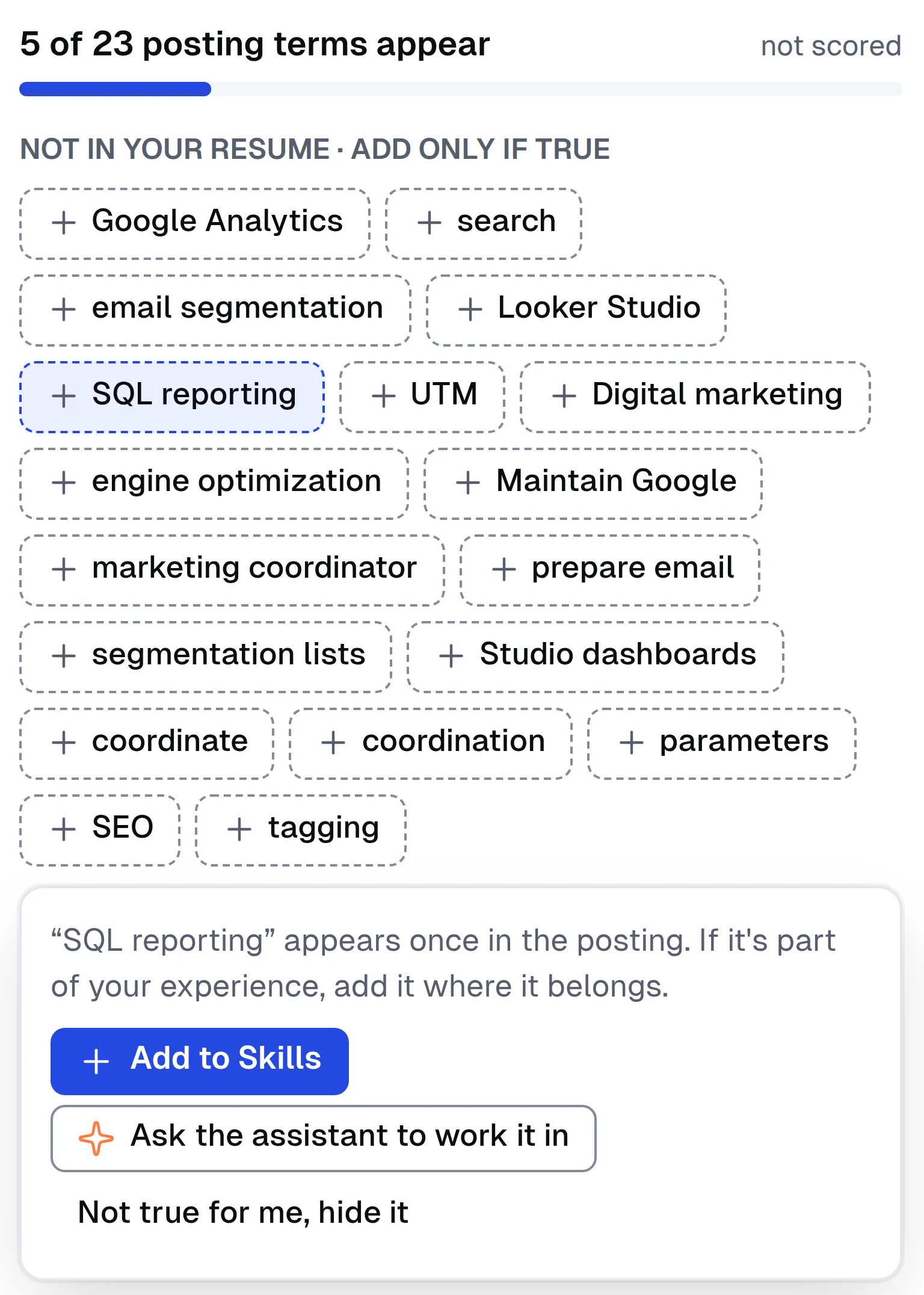
The count shows how many of the posting’s terms appear in the file. It doesn’t measure your chances of an interview, and the checker says the same of its score.
Where to put keywords on your resume
Headline or actual title: A headline beneath your name may describe your target area if accurate. Do not rename a previous position to imitate the job ad.
Summary: Choose a small number of qualifications that explain why your experience is relevant. Avoid a long list of tool names without context. Our resume objective guide explains when an objective or a summary fits.
Skills: Name specific software and methods you can use. The hard skills guide shows how to back them up; the resume sections guide shows where they belong.
Experience bullets: Put the strongest terms beside the tasks that prove them. “Built a Looker Studio dashboard for campaign reporting” gives more information than “Looker Studio” alone.
Projects and education: Use these sections when coursework, volunteer work, or personal projects are your best honest evidence. Put a required credential under its proper name and issuer.
For help with a readable PDF, see the tested ATS-friendly resume checklist. A clear text order matters independently of which keywords you choose.
For a full example, see the Skills and Experience sections in our copy-ready ATS-friendly resume. The tool names in its Skills section also appear in the work those bullets describe.
Should you use exact wording, acronyms, and synonyms?
When a posting uses an established name for something you have done, use that name. If you worked in Google Analytics 4, write “Google Analytics 4 (GA4)” once, then use “GA4” where it reads naturally. If you did search engine optimization work, the expanded term and “SEO” can clarify the same experience.
Do not promise yourself that every ATS will interpret acronyms, variants, and synonyms identically. Vendor search tools differ, and even the same platform can be configured differently. Use common terms to make the meaning clearer for human readers as well.
Check the wording in your exported PDF
Export your resume, confirm the text is selectable, and check its reading order. Then provide the PDF and the same job posting to the ResumeUnbox ATS-style checker.
For each missing term, ask whether you genuinely have the skill, used another accurate phrase, or should leave the qualification out. In Talia’s example, the count went from 5 to 20 of 23 terms, and the three terms still missing were checked one by one rather than added.
A checker comparison shows which terms appear in the uploaded PDF. Review every missing term against your real experience. Term overlap does not measure your chances of an interview.
Keyword mistakes worth avoiding
Repeating the same phrase everywhere. “Google Analytics 4” in a skills list and in a relevant bullet can make sense. Stuffing it into every sentence makes the resume harder to read.
Putting hidden white text in the PDF. Invisible keywords do not describe your experience to a reader and can make the document misleading. Keep all meaningful claims visible.
Treating preferred requirements as a checklist to fake. A role may ask for a tool you have never used. Leave it out; do not turn casual familiarity into professional experience.
Replacing experience with a keyword list. A skills section helps scanning. The experience and projects sections explain how you used those skills.
Reusing one resume for unrelated jobs. Tailoring can mean changing which truthful examples you lead with. It does not require reinventing your history.