Is Workday an applicant tracking system? What it does
Yes, Workday Recruiting is an ATS. Learn what it does with your resume, what employers control, and how to check your file before you apply.


Is Workday an ATS or an HR platform?
Both. An ATS helps an organization receive job applications and manage recruiting. Workday’s explanation of applicant tracking systems describes collecting applications, extracting resume information, and organizing candidate records.
Workday Recruiting is part of a broader platform used for human resources. Its administrator guide documents job requisitions, candidate pipelines, screening, recruiter review, and dispositioning (recording why an application was declined). It’s the part that matters when you apply for a job.
The distinction is useful because an employer’s Workday career site is only the candidate-facing part. Recruiters can see additional information and perform actions you cannot see from your application page.
What happens to your application in Workday?
The table separates features documented by Workday from employer choices and things an outside applicant cannot verify. Workday’s administrator guide, candidate guide, and resume-parsing documentation are the primary sources.
| Application step | What Workday documents | What the employer controls | What you may not know |
|---|---|---|---|
| Account and application | External candidates apply through a company’s career site; records are associated with a specific application. | Sign-in experience, required sections, and application templates. | Which optional configuration the employer selected. |
| Resume upload and autofill | Uploaded resumes can populate fields such as work history and education. Parsing varies by document format and order. | Whether resume parsing is offered and which fields appear. | Exactly how each line was parsed until you review the fields. |
| Screening questions | Workday supports disqualification questions that can automatically decline candidates when configured. | The questions and disqualification rules. | Whether a specific answer triggers a rule unless disclosed. |
| Recruiter search and review | Recruiters can review candidate qualifications and narrow the hiring funnel; Workday also supports candidate ranking functions. | Who reviews applications, search criteria, and available tools. | The filters or priority used for this job. |
| Candidate movement and disposition | Teams track candidate stages and reasons for declining applications. | Workflow steps, who advances applicants, and decline reasons. | The full internal reasoning behind an individual decision. |
| Additional AI capabilities | Workday documents a separate HiredScore product with candidate grading and filters. | Whether the employer uses that product and which capabilities it enables. | Whether your application was graded by an optional tool. |
After uploading a resume, check every autofilled field. Workday’s resume parsing guidance says results vary with format and word order. Workday does not autofill fields an employer has hidden, or the Skills and Languages fields. Enter those details yourself when the application asks for them. A correct-looking PDF does not mean the application form contains the correct employment dates.
Before uploading, you can try the ResumeUnbox ATS-style checker to examine your document’s readability. It is a separate tool, not Workday’s parser.
Does Workday automatically reject resumes?
It can automatically decline an application based on an employer-configured screening answer. Workday’s administrator guide explicitly says disqualification questions can trigger an automatic decline when configured.
Consider a hypothetical job that requires a professional license. The employer might ask whether you hold it and configure an answer to disqualify applicants. That example illustrates a possible rule; we do not know what any particular employer has configured.
This is different from the claim that Workday rejects most resumes because they lack enough keywords. The documentation above does not establish a universal keyword cutoff or a standard rejection percentage across employers. Workday has features for ranking candidates, and its separate HiredScore AI for Recruiting documentation describes grading applicants against job requirements. That does not show that every employer uses HiredScore or that its grades cause automatic rejection.
Why Workday applications differ between employers
You may have to create a separate candidate account for each employer’s Workday career site. The Workday Candidate Profile FAQ explains the existing account-by-account experience and says that even the new reusable profile creates a Candidate Home account with the specific employer when you apply. Each employer operates its own hiring workflow.
Workday’s application template guidance allows employers to customize which fields are required, visible, or parsed from a resume. An application that asks for extra questions is not necessarily being evaluated by a different ATS. The organization may have configured its Workday application differently.
A change announced in October 2026: Workday introduced Workday Candidate Profile, a planned way for job seekers to save their information and reuse it across participating Workday-powered career sites. According to Workday’s announcement on October 13, 2026, general availability is expected in early 2027. As of November 2026, do not assume your next application already supports it.
Workday says Candidate Profile does not rank, recommend, or reject applicants. It helps fill in information candidates choose to save. The candidate FAQ also makes clear that each employer keeps its own hiring steps and screening questions. That statement describes Candidate Profile, not every function elsewhere in Workday Recruiting.
A worked resume example: the same content in two layouts
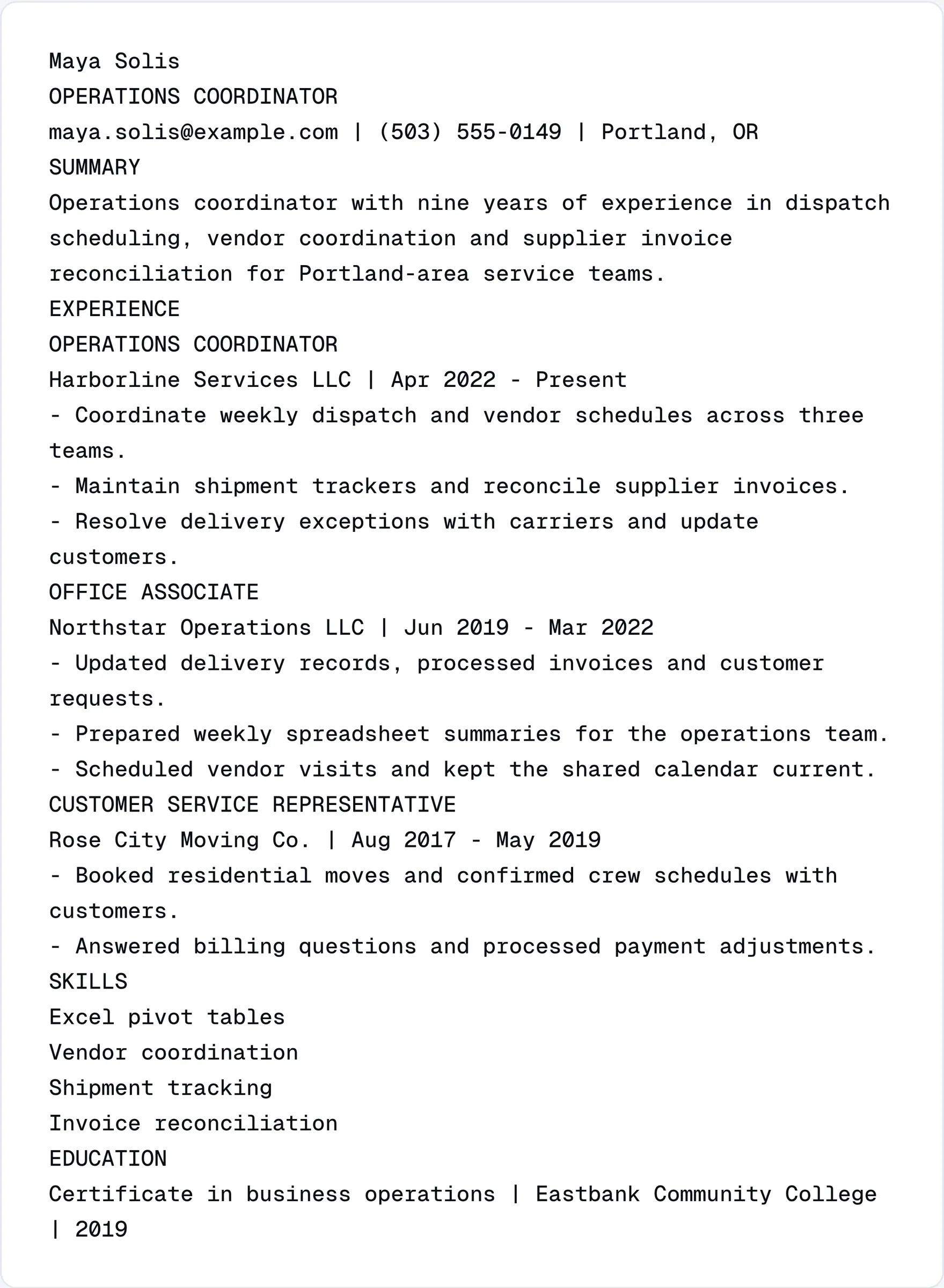
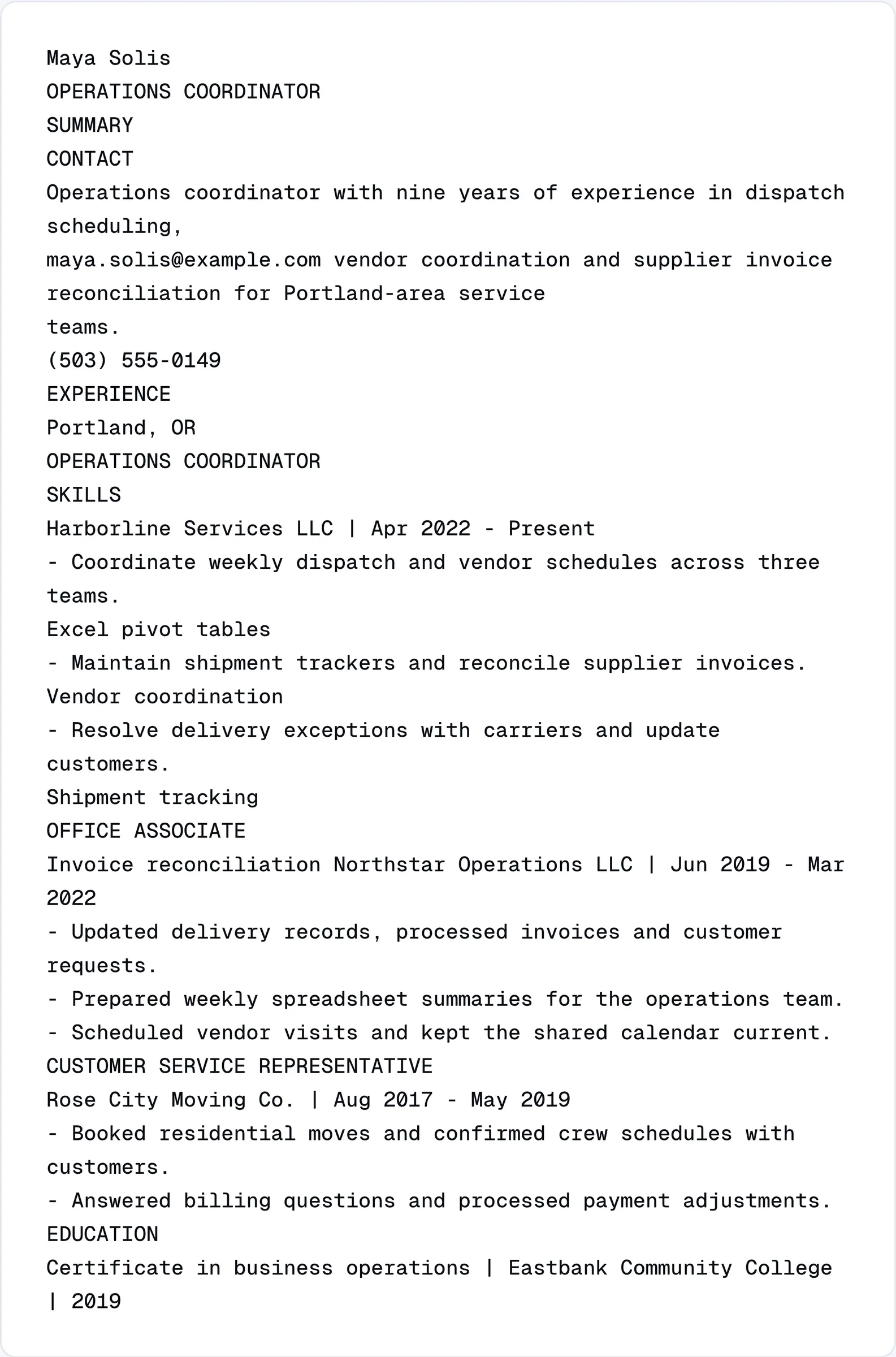
We previously tested two PDF layouts of the same fictional resume for Maya Solis, an operations coordinator. The content was identical: contact details, summary, experience, employers, dates, skills, and education. One file used a straightforward single-column structure. The other placed contact information and skills in a sidebar beside work experience.
For our published ATS-friendly resume experiment, we tested both PDFs on November 3, 2026 in the ResumeUnbox ATS-style checker, without a job posting. The single-column layout scored 98 for readability and the two-column layout scored 55. The two-column file retained the checked fields, but its sidebar and work history were interleaved in one text extractor. This is a reuse of our published ATS-friendly resume experiment, not a Workday-specific test.
| Resume version | Our checker result | What it revealed |
|---|---|---|
| Single-column | 98 (original report) | No layout-specific warning. |
| Two-column | 55 (original report) | One reading-order warning. |
These are readability scores, not predictions of rejection or interview odds. The screenshots below show what its As software reads it view extracted from each file. Our ATS-friendly resume experiment contains the PDFs and method.
Single-column: what the checker reads
Two-column: what the checker reads
What this does not test: We did not upload these PDFs to a Workday employer account or measure how Workday itself parsed them. The comparison demonstrates a document readability issue in ResumeUnbox and in local text extraction, not an outcome inside Workday.
How to prepare your resume for a Workday application
The most useful steps are the ones you can verify yourself.
For a broader explanation of parsing and formatting, see our evidence-based ATS-friendly resume guide. If you are revising section names or order, use our resume sections guide. To match a posting’s terms honestly, see our resume keywords guide.
Before you upload, use our complete ATS-friendly resume sample to compare your section order and check the text in your exported PDF.
How does Workday compare with other ATS platforms?
Workday Recruiting, Greenhouse, Lever, iCIMS, SAP SuccessFactors, and Oracle Taleo are examples of applicant tracking systems. Their features and employer settings differ. For example, Greenhouse documents its resume-parsing behavior and describes layouts that can be difficult to parse. That is evidence for Greenhouse, not proof of how Workday processes the same document.
The practical rule does not change: follow the job posting, make essential details readable, and check what the employer’s application form imported. A template advertised as “ATS-friendly” cannot verify an individual employer’s screening rules.
Questions about Workday applications
Is Workday a legitimate hiring platform?
Does Workday automatically reject applicants?
Why do I have to make another Workday account?
Can I get past Workday by adding more keywords?
Workday’s configuration varies by employer. You can improve the clarity and accuracy of your application, but only the employer knows its full screening process.