What is an ATS-friendly resume? A checklist we tested
What makes a resume ATS-friendly? See four real ResumeUnbox checker scores, screenshots, and findings with practical PDF formatting advice.

What does ATS-friendly mean?
An applicant tracking system (ATS) helps employers collect applications, track candidates, and manage the hiring process. Some systems extract the contents of your resume into fields that recruiters can review or search. Workday’s explanation of applicant tracking systems describes resume parsing and searchable candidate profiles. Our guide to whether Workday is an ATS explains what it does with your application. Greenhouse documents its own resume parsing and the situations where it can fail.
ATS-friendly describes a document with selectable text and recognizable sections that parsing software can interpret. Our guide to resume sections lists the standard headings to use. Employers may separately evaluate screening answers, and recruiters still need a clear account of your actual work.
The practical test is simple: when you copy or extract your resume’s text, does the content appear in a logical order, with your name, contact information, work history, education, and skills intact? Once the text reads in order, our guide to resume keywords shows which terms from a posting to use.
How an ATS handles a resume
A typical hiring workflow can involve collecting your application, extracting document text, storing your profile, and letting recruiters search or filter candidates. Not every employer uses the same steps or configuration.
For example, Greenhouse explains that recruiters can search resumes for keywords. That helps explain why using an accurate job title or a specific, true skill can matter. Repeating a keyword by itself does not establish your qualifications.
Automatic rejection can be about application answers rather than typography. Greenhouse’s auto-reject documentation shows how an employer can configure a rule for an answer to an application question. A required professional license is its example. That is a screening rule chosen by an employer, not evidence that a resume font triggered rejection.
Our comparison: four PDF layouts with the same resume
We exported four PDFs of the same fictional resume for Maya Solis, an operations coordinator. The summary, employers, dates, experience bullets, contact details, four skills, and education are identical. Only the layout changes:
- Single column: Contact details and sections follow one text flow.
- Two columns: Contact details and skills sit in a sidebar alongside experience.
- Skills in a table: The four skill labels are arranged into two rows of cells.
- Running page header with icon fonts: The contact line is placed above the document body, next to actual envelope, phone, and map-marker font glyphs.
All four contain selectable text. We did not flatten any section into a picture or intentionally remove any qualifications.
Test method and results
On November 3, 2026, we uploaded each of the four fictional PDFs to the ResumeUnbox ATS-style checker, without a job posting. The screenshots below show its genuine reports, supplied with the complete list of findings. We also checked the same PDFs locally with PyMuPDF 1.26.7 and pypdf 5.9.0 to compare their extractable text and reading order. The local test is separate from the checker scores.
| PDF layout | Checker score | Report verdict | Distinctive finding |
|---|---|---|---|
| Single column | 98 | Reads cleanly | No layout-specific warning |
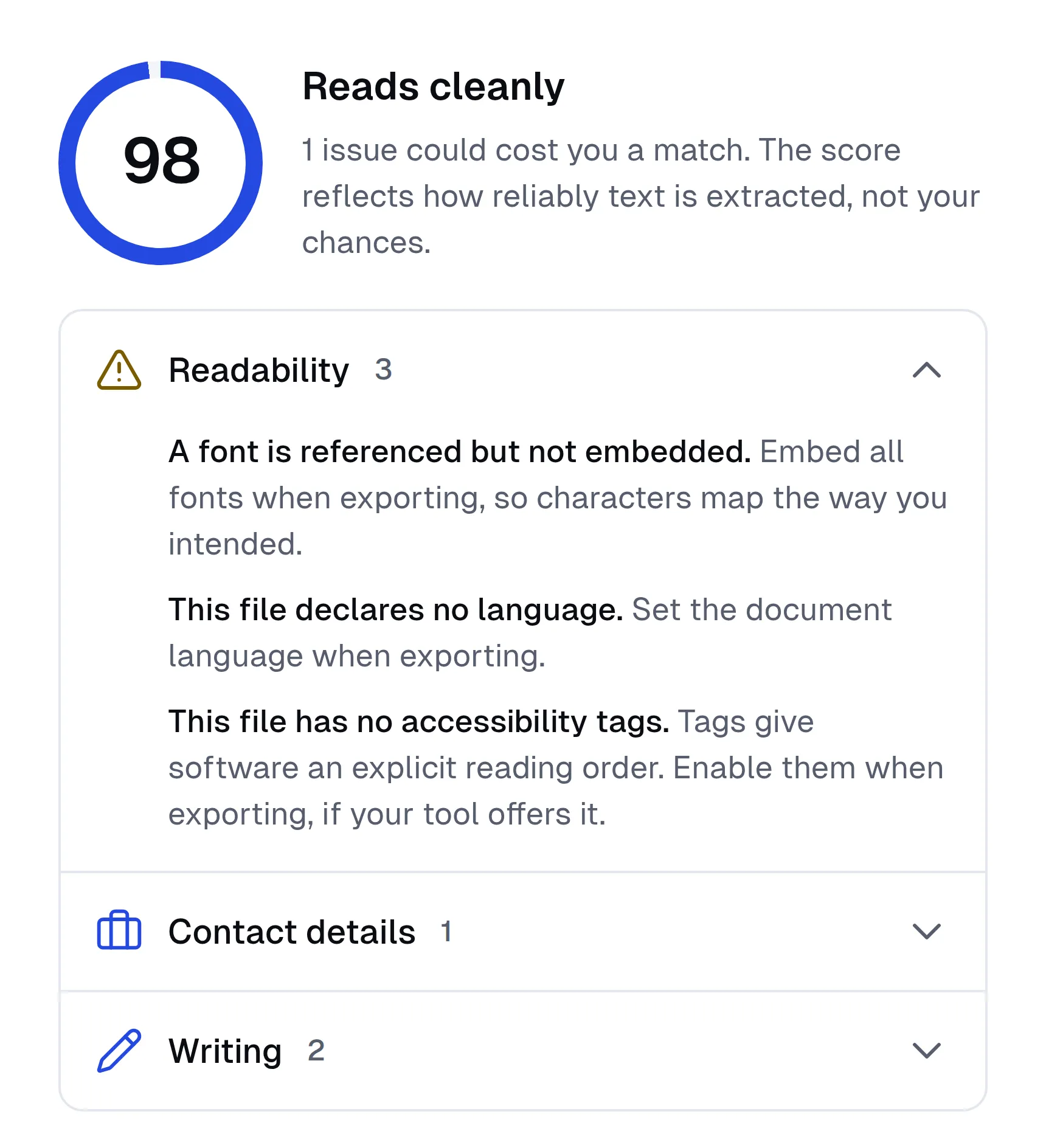
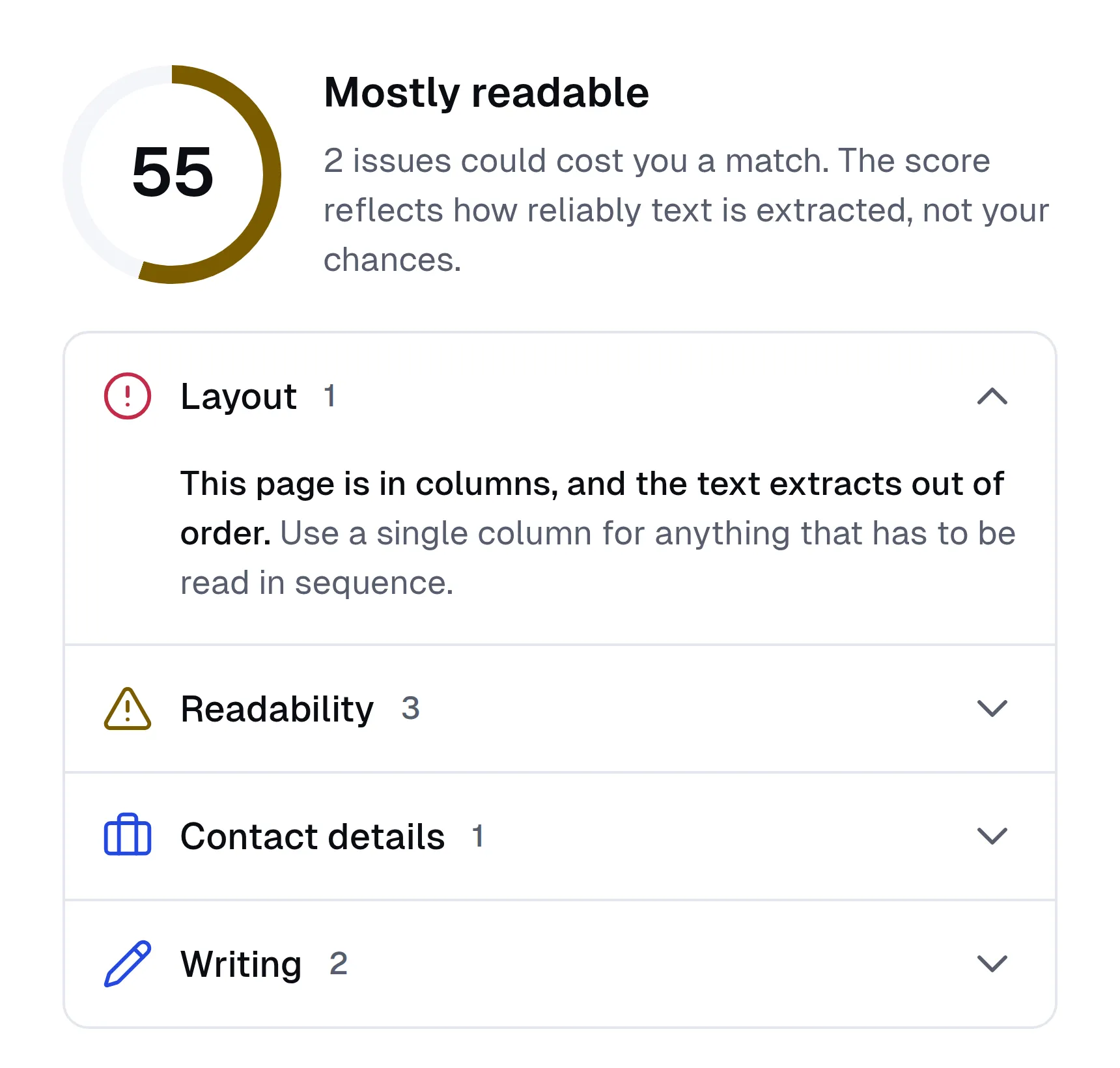
| Two columns | 55 | Mostly readable | One warning that the columns extract out of order |
| Skills table | 98 | Reads cleanly | No table-specific warning |
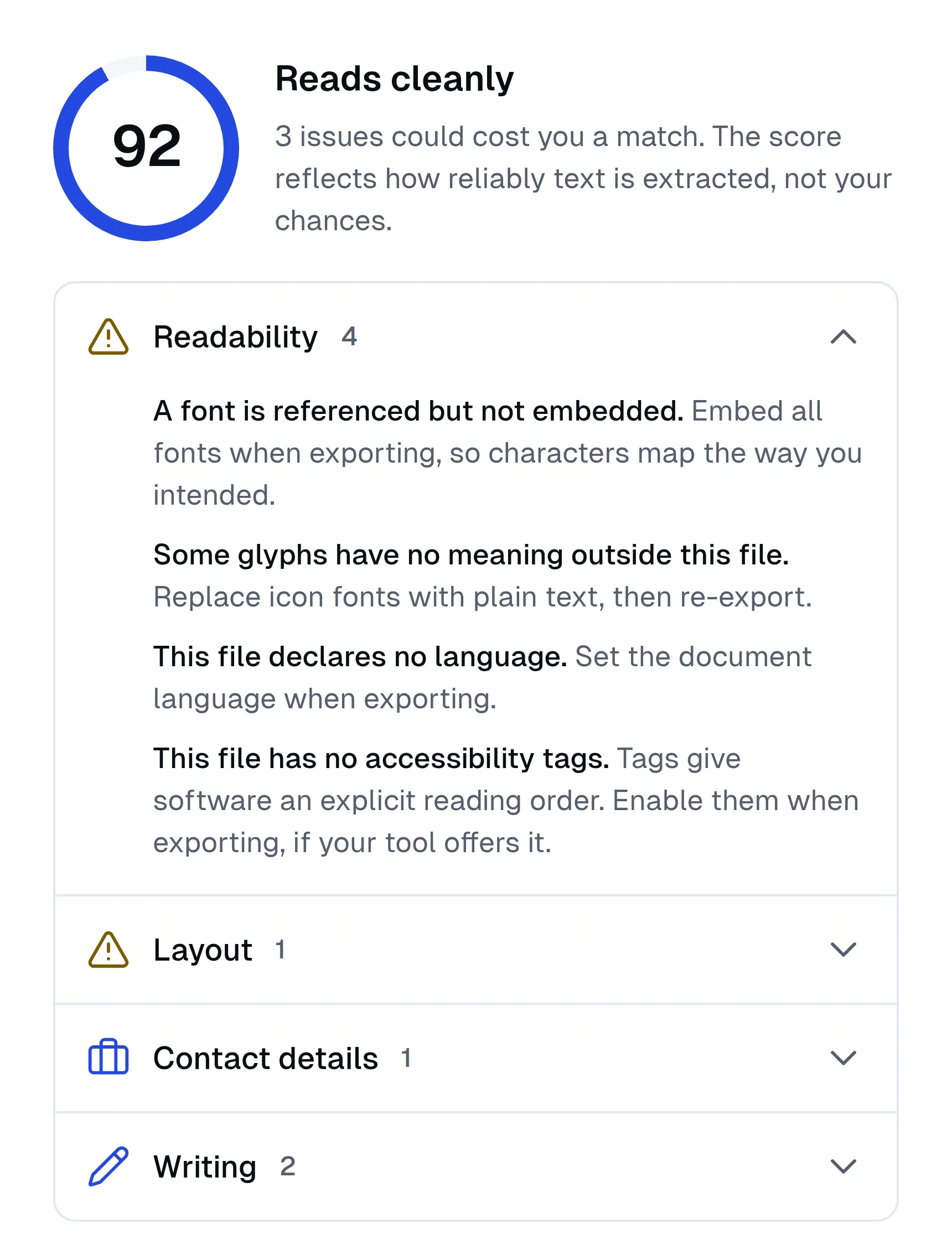
| Running header with icon fonts | 92 | Reads cleanly | Unmapped icon glyphs and unusual bullet characters |
What the scores mean: They reflect the checker’s assessment of these files’ readability. They do not predict interview odds, and the checker does not reproduce any specific employer’s ATS configuration.
1. Single-column resume
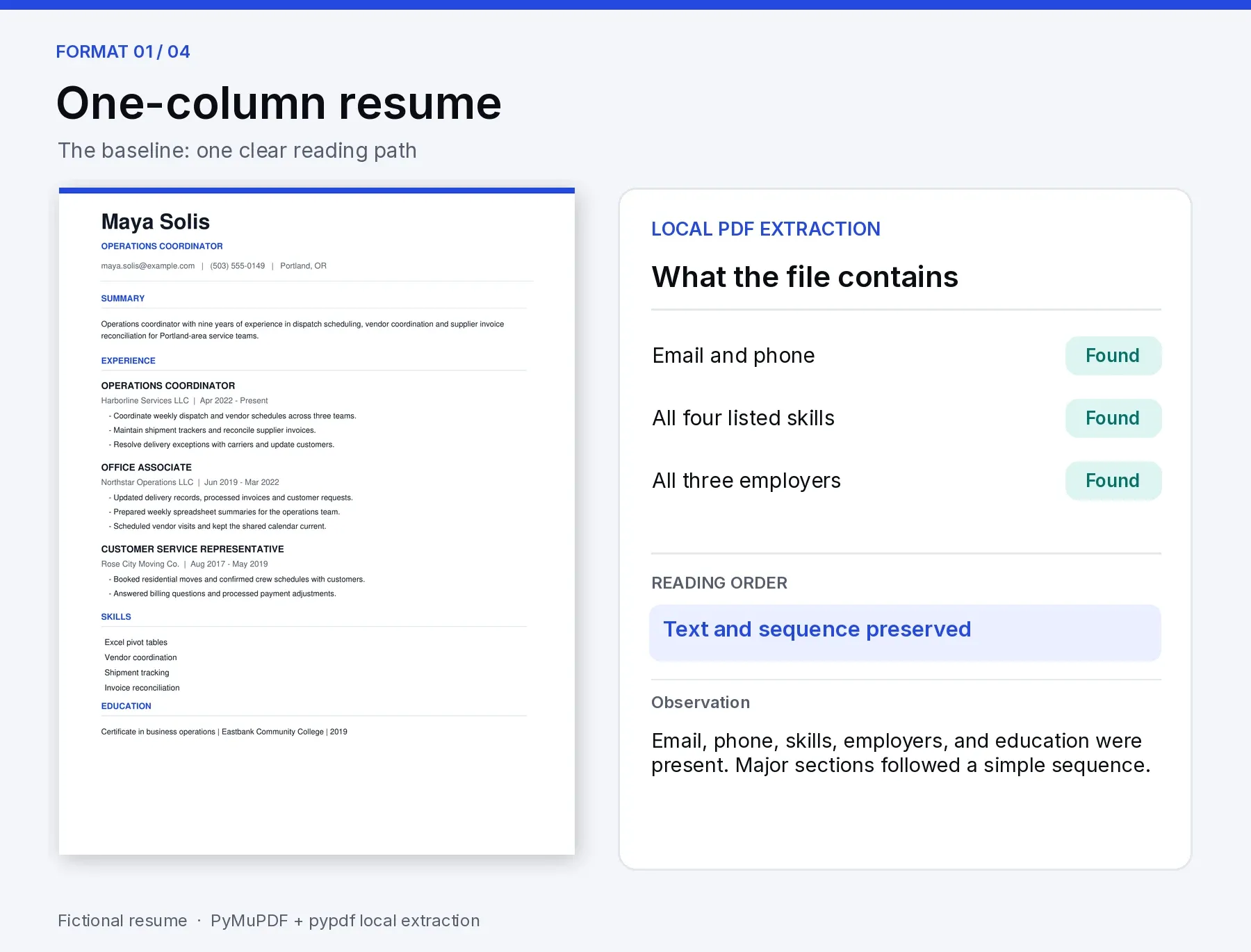
Checker: 98 — Reads cleanly. There was no layout warning. The report also flagged the shared export, contact, and writing suggestions.
2. Two-column resume
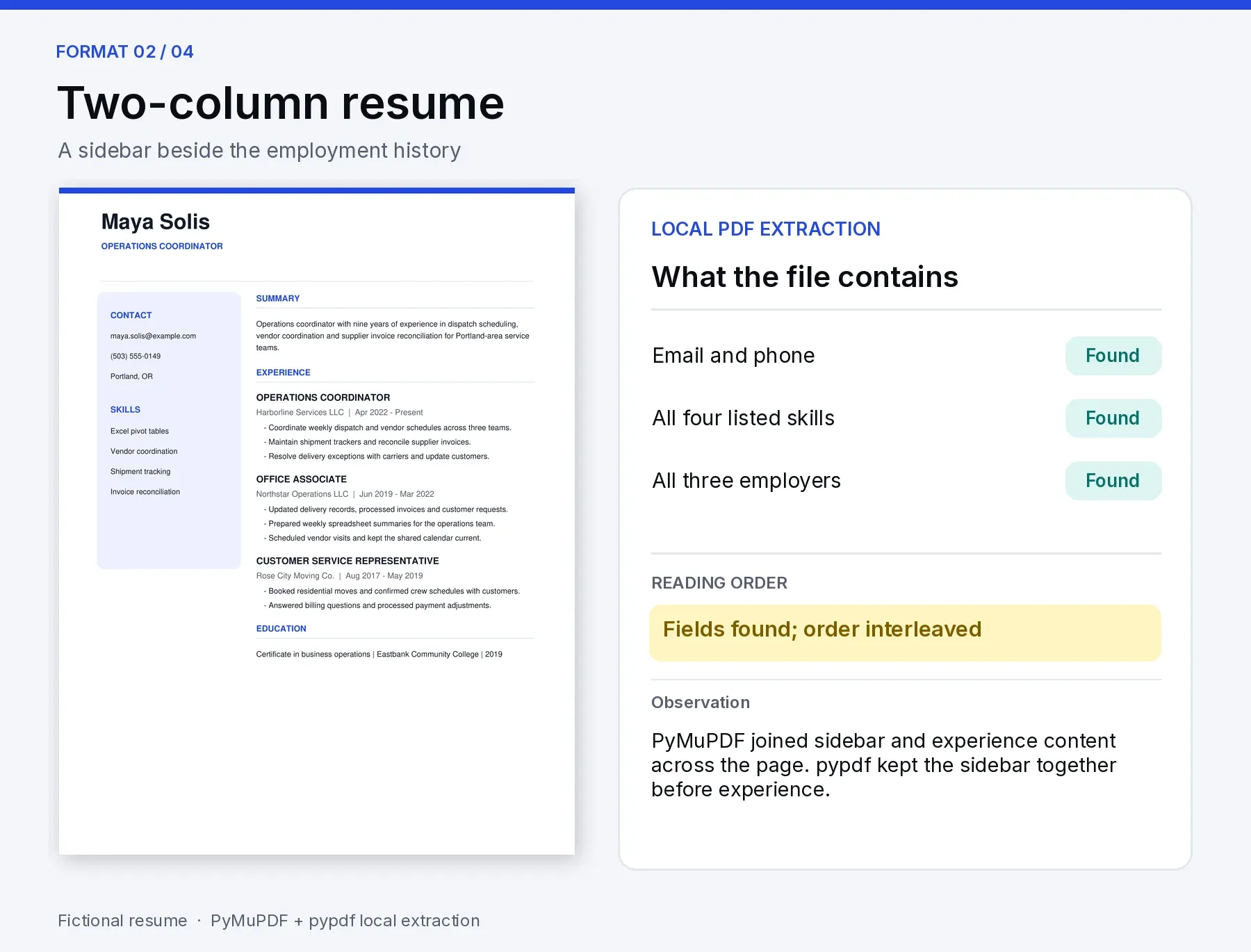
Checker: 55 — Mostly readable. The report identifies one layout problem: the columns extract out of order. It does not say the resume would be rejected.
3. Skills in a table
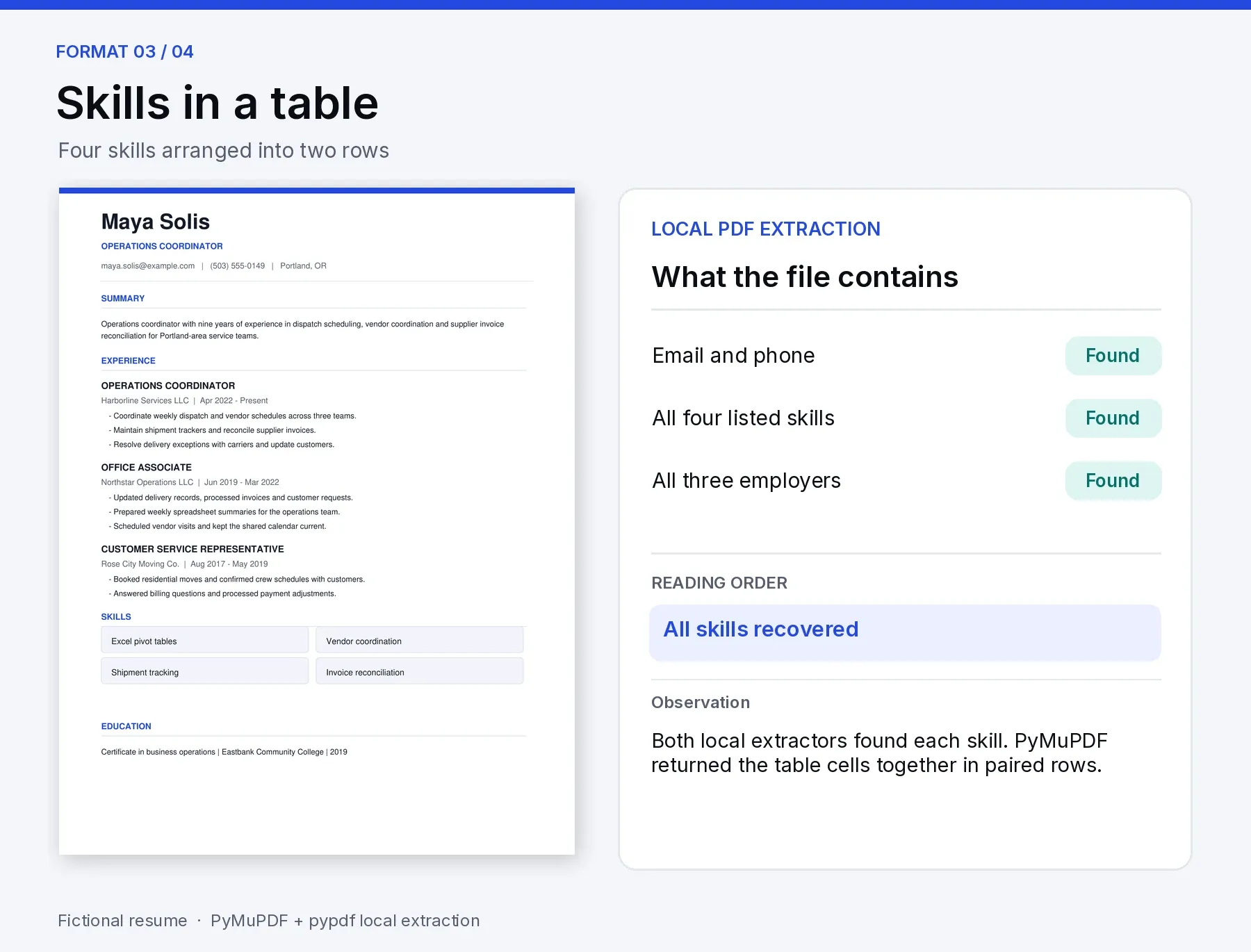
Checker: 98 — Reads cleanly. The two-column skills grid did not trigger a separate table finding. The report still includes the same general export and content suggestions as the single-column version.
4. Running page header with icon fonts
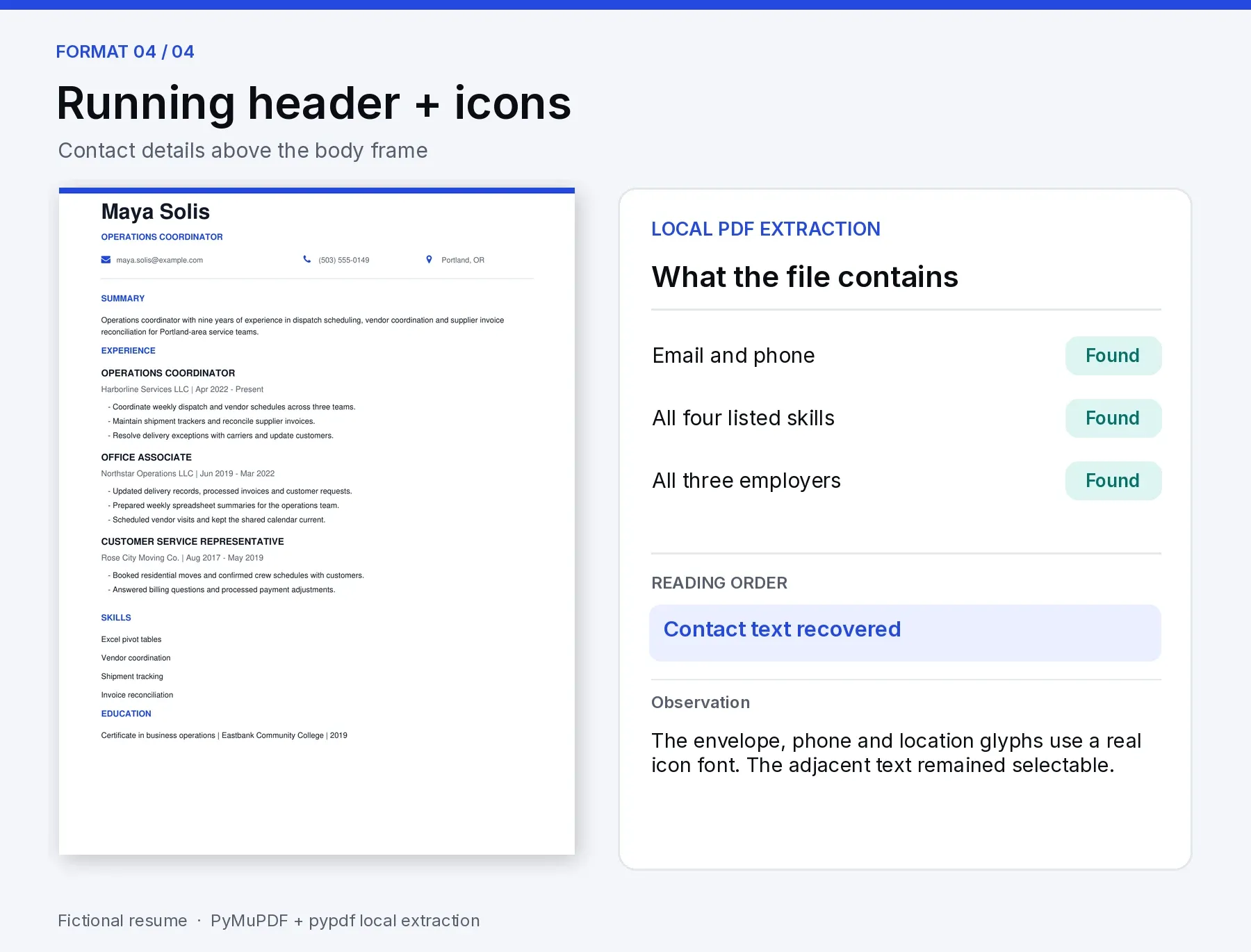
Checker: 92 — Reads cleanly. The report flagged icon-font glyphs that may have no meaning outside this file and unusual bullet characters, on top of the shared formatting and content findings.
| PDF layout | Email and phone | Four skills | Employers | Reading-order observation |
|---|---|---|---|---|
| Single column | Found | Found | Found | Major sections followed the expected sequence |
| Two columns | Found | Found | Found | PyMuPDF interleaved the sidebar with experience |
| Skills table | Found | Found | Found | PyMuPDF paired skill cells on individual lines |
| Running header with icon fonts | Found | Found | Found | Contact words extracted beside icon glyphs |
Findings shared across the reports
Across all four PDFs, the checker flagged a font reference that was not embedded, missing document language metadata, and missing accessibility tags under Readability. Under Contact details, it recommended adding a profile, portfolio, or repository link. Under Writing, it suggested adding numbers to bullets and starting them with concrete verbs. Our eight-font resume comparison examines font embedding separately and shows one export fix.
The two-column report alone added a layout-order warning. The icon-font header report added an unmapped-glyph warning under Readability and an unusual-bullet-character warning under Layout.
These are the complete finding categories from the four reports, including those collapsed in the screenshots. The same fictional content was intentionally kept across layouts. A recommendation to add numbers is not permission to invent achievements.
The actual text extracted from the first two layouts
These are verbatim, contiguous excerpts from PyMuPDF’s position-sorted text, with spaces and line breaks preserved.
Single column:
EXPERIENCE

OPERATIONS COORDINATOR
Harborline Services LLC  | Apr 2022 - Present
   - Coordinate weekly dispatch and vendor schedules across three teams.
Two columns:
                         SUMMARY
  CONTACT
                                         Operations coordinator with nine years of experience in dispatch scheduling,
  maya.solis@example.com               vendor coordination and supplier invoice reconciliation for Portland-area service
                                        teams.
   (503) 555-0149
                             EXPERIENCE   Portland, OR
PyMuPDF’s sorted output combines content that sits at similar heights across the two columns. pypdf returned a different reading order for that same two-column PDF: it kept contact and skills together, before Summary and Experience. This is the verbatim relevant segment from its output:
CONTACT
maya.solis@example.com
(503) 555-0149
Portland, OR
SKILLS
Excel pivot tables
Vendor coordination
Shipment tracking
Invoice reconciliation
SUMMARY
The ATS-friendly resume checklist
These are low-risk defaults, especially when you cannot know what software an employer uses.
Try the ResumeUnbox ATS-style checker on your final exported PDF to inspect its readability report. Its findings are tool-specific, not hiring odds.
Annotated example: the single-column PDF
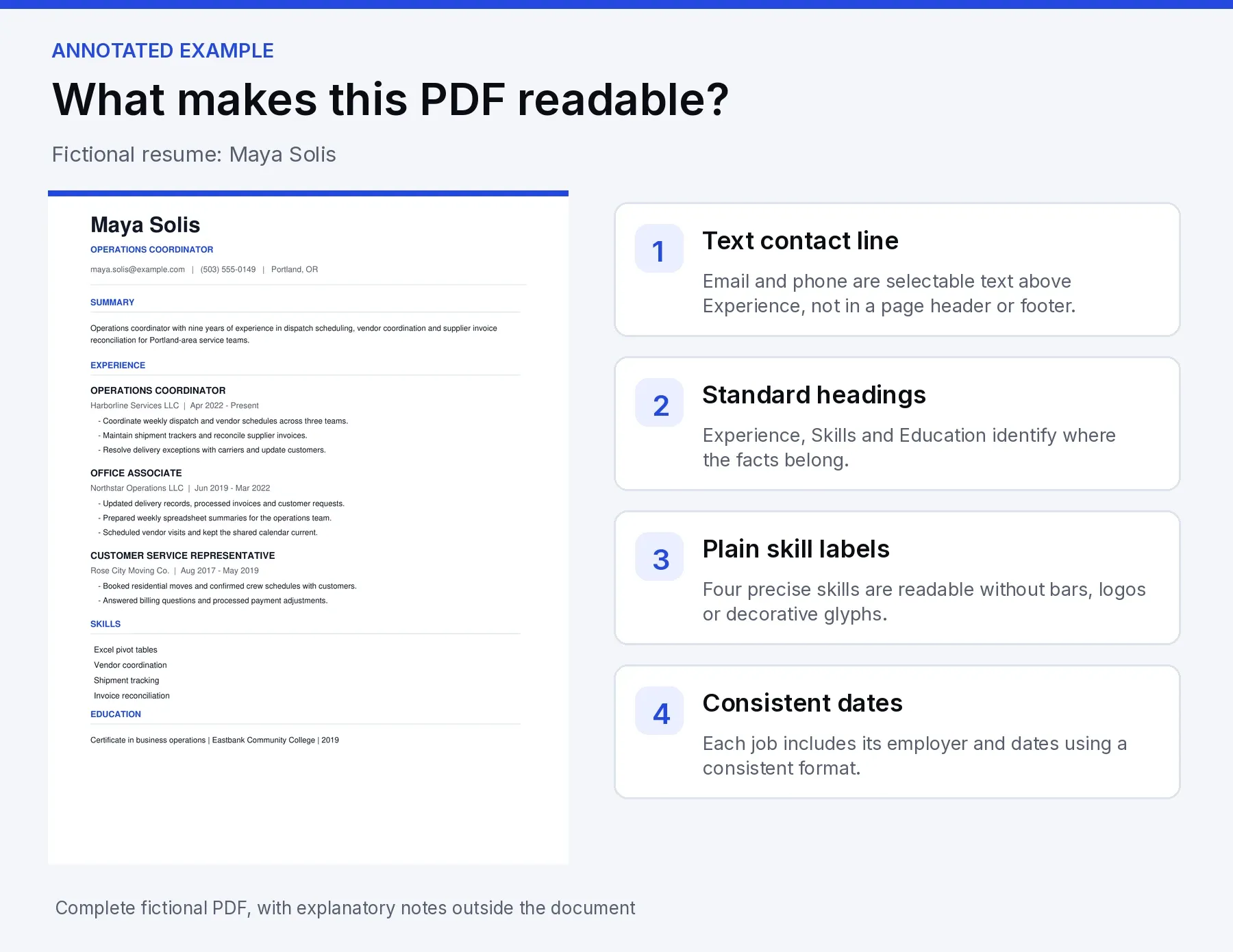
The annotation matches the actual exported PDF: Maya Solis’s selectable contact line, the Experience and Education headings, Harborline Services LLC with dates Apr 2022 - Present, and all four listed skills (Excel pivot tables, Vendor coordination, Shipment tracking, Invoice reconciliation). It also shows the employment bullets and the certificate from that same fictional document. Nothing was added or rewritten for this illustration.
For a complete sample you can copy, see our tested sample ATS-friendly resume, with the exported page and full extracted text.
PDF or Word: which file is safer?
Follow the job posting first. Some employers request a particular file type or provide a required form. If the application accepts either, choose the format that preserves your text and looks correct when opened.
Greenhouse lists PDF and DOCX among accepted candidate uploads. Its candidate guidance recommends PDF for that product, while also reminding applicants to review parsed fields.
A PDF containing selectable text is different from a scanned image. If you cannot select your resume’s words, do not assume software can recover them reliably. Export a text-based PDF from your document editor rather than taking a photo of the page.
Are resume templates ATS-friendly?
A template can work well if the exported document remains readable. Some templates use columns, icons, tables, and decorative text boxes. Those elements are not automatic rejection rules, but they are reasons to inspect the actual PDF rather than trusting the editor’s preview.
Copy the final PDF’s text into a plain-text document. Check the order of sections, every contact field, job titles, dates, and skills. If a template scrambles them, change the layout or choose a simpler template before applying.
Which ATS myths hold up?
| Common claim | What the evidence supports |
|---|---|
| “All ATSs reject two-column resumes.” | Too absolute. Our checker scored this two-column PDF 55 and found a reading-order problem. That does not establish automatic rejection by every ATS. |
| “PDF resumes never work.” | False as a general rule. Greenhouse accepts PDFs. Follow the employer’s requested format. |
| “Tables and header icons always make details disappear.” | Too absolute. The skills table scored 98 without a table warning. The icon-font header scored 92 and received glyph and bullet warnings, although the contact words were locally extractable. Neither result proves universal compatibility. |
| “An ATS score is your chance of an interview.” | Unsupported. A text-readability check cannot measure how a recruiter or employer will decide. |
| “70–75% of resumes are rejected by ATS before a person reads them.” | Unsupported: We could not verify published underlying data or a reproducible method for that figure. It should not be presented as a measured rejection rate. |
| “Screening questions can cause automatic rejection.” | Documented for some configurations. Greenhouse shows employer-controlled rules linked to specified answers. |
Greenhouse’s guidance on unsuccessful parsing mentions column layouts, text boxes, graphics, headers, and complex tables as possible causes of partial imports. Those are reasons to check your file, not reasons to strip away every useful design choice.
How to check your resume before applying
- Open the final PDF. Select the body text. If your resume behaves like a picture, export it again as a text-based file.
- Copy all the text into a plain-text editor. Check your name, email, phone, headings, employers, job titles, dates, and skills. Look for broken words and mixed reading order.
- Compare the result with the job posting. Keep important terms that are true for you, stated in a natural way. Don’t add a skill solely because the posting mentions it.
- Check the application form’s imported fields. If the site asks you to confirm or edit parsed details, correct any errors there before submitting.
You can also open the ResumeUnbox ATS-style checker to inspect your own document. This is a readability check, not a simulation of a named employer’s hiring decision. A plain-text copy check remains useful regardless of which tool you choose.
For additional practical resume advice, explore the ResumeUnbox blog, or start at ResumeUnbox to work on your document.